Hello. I am Pete, and I love the Atari 8-bit range of computers. You probably knew that already, but I wanted to talk about it a bit today.
I think I'm probably going to make a video along these lines sometime soon — although my prior video on the announcement of The400 Mini a while back covers a lot of the points I'd want to cover — but it's on my mind today, so that's what we're talking about today.
One of the reasons I want to talk about Atari 8-bit computers is because I don't feel they get nearly enough respect. No, they were by no means as popular as the Commodore 64 and Spectrum — the former of which is the subject of a cover feature in Retro Gamer magazine this month — but I also feel like they had a significantly stronger foothold in the market than other "failed" micros from the era. Not only that, but they are historically very significant for a number of reasons, some of which I'll try and outline today.
This is going to be a bit of a stream-of-consciousness sort of probably autistic infodump, because I'm just banging this out as I feel like it. If and when I do decide to make a video about all this, there will probably be a bit more structure, research, that sort of thing. Like I say, this was just rattling around in my head today, though, so I wanted to at least get some thoughts down on paper. So here it is.
For the unfamiliar, the Atari 8-bit range consists of several models:
- The Atari 400, which released in 1978, and initially features 8 kilobytes of RAM, though later revisions bumped this up a bit. This was marketed in some areas as a games machine, as it was the cheaper of the two models to release in 1978, had four joystick ports and sported a flat, supposedly spill-proof membrane keyboard to make it suitable for "family" use.
- The Atari 800, which released alongside the 400 in 1978, and was positioned as a more "serious" machine. It had a "normal" keyboard, user-upgradable RAM (up to a maximum of 48 kilobytes) and two cartridge slots instead of one (though there were very few releases that took advantage of this) — and it cost considerably more.
- The Atari 1200XL was the first step in a refresh of the Atari 8-bit line in 1983, intended to replace the 800. It came with 64 kilobytes of RAM, a completely redesigned case, built-in self-test features and a rather nice keyboard. It was also much too expensive and had a number of issues, causing Atari to pull it from sale before long, and to not release it in PAL territories at all.
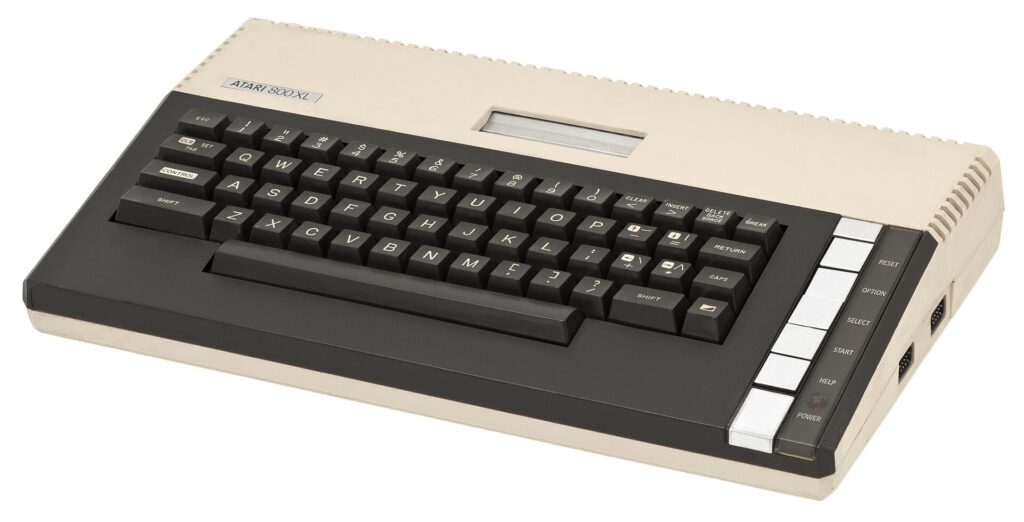
- The Atari 800XL (pictured above) was a do-over of the 1200XL project. It also had 64 kilobytes of RAM, the newly designed case (now not quite so deep), built-in self-test features and lovely keyboard, but also added built-in BASIC to the mix along with revisions to the operating system. It was Atari's best-selling 8-bit home computer.
- The Atari 600XL was a cost-reduced version of the 800XL, which had an even slimmer case and only 16 kilobytes of RAM. With the 800XL replacing the 800, this was effectively the replacement for the 400, but it did not sell very well compared to its big brother.
- The Atari 130XE was launched in 1985, after Jack Tramiel took over Atari, and was designed to look like a "little brother" to the 16-bit Atari ST. It featured 128 kilobytes of RAM, new revisions of the operating system and BASIC and a new case design, but otherwise didn't bring anything significantly new to the table. It is a nice machine, though, and my Atari 8-bit of choice.
- The Atari 65XE was essentially identical to the 130XE, only with 64 kilobytes of RAM instead of 128.
- The Atari XEGS was a 65XE in a console-style case with a detachable keyboard. It was positioned primarily as a games console, even more explicitly than the 400 back in 1978, but was a fully functional computer that would work with all Atari 8-bit peripherals.
Broadly speaking, these models are all cross-compatible with one another, aside from obvious exceptions such as programs that need a particular amount of RAM to run properly. There are a few compatibility issues between very early pieces of software that were designed for the 400 and 800 and the later XL/XE models, but these can usually be got around by using a "translator" program to temporarily load in an older version of the operating system, and the Atari community at large has also been hard at work patching many games to work universally on all Atari 8-bit systems.
Like most other 8-bit computers, the Atari 8-bit had three means of loading software: ROM cartridge, cassette tape or 5.25" floppy disk. ROM cartridges are incredibly simple: plug them in, turn on the machine and the software is there, ready to go. These were primarily used for games, particularly in the early days of the platform, but there are some pieces of utility or productivity software that run from cartridge, too. Notably, using a cartridge effectively allows the ROM within to "extend" the Atari's capabilities; a good example of this is the SpartaDOS X package, which adds an MS-DOS style command line for manipulating files on floppy disks.
Cassette tapes were certainly used by Atari enthusiasts, but not to the same extent as on the Commodore 64 and ZX Spectrum. The reason for this is that the tape loading system in the Atari 8-bit was significantly slower than on its main rivals, resulting in load times of half an hour or more for games that would take just a few minutes on other platforms. That said, the Atari 8-bit could make innovative use of the tape medium by playing back audio during a program — a good example of this is the Conversational Language series of packages, which teach French, German, Italian and Spanish through interactive lessons, with recorded speech coming straight off the tape and being played back through the TV speakers at the appropriate moments.
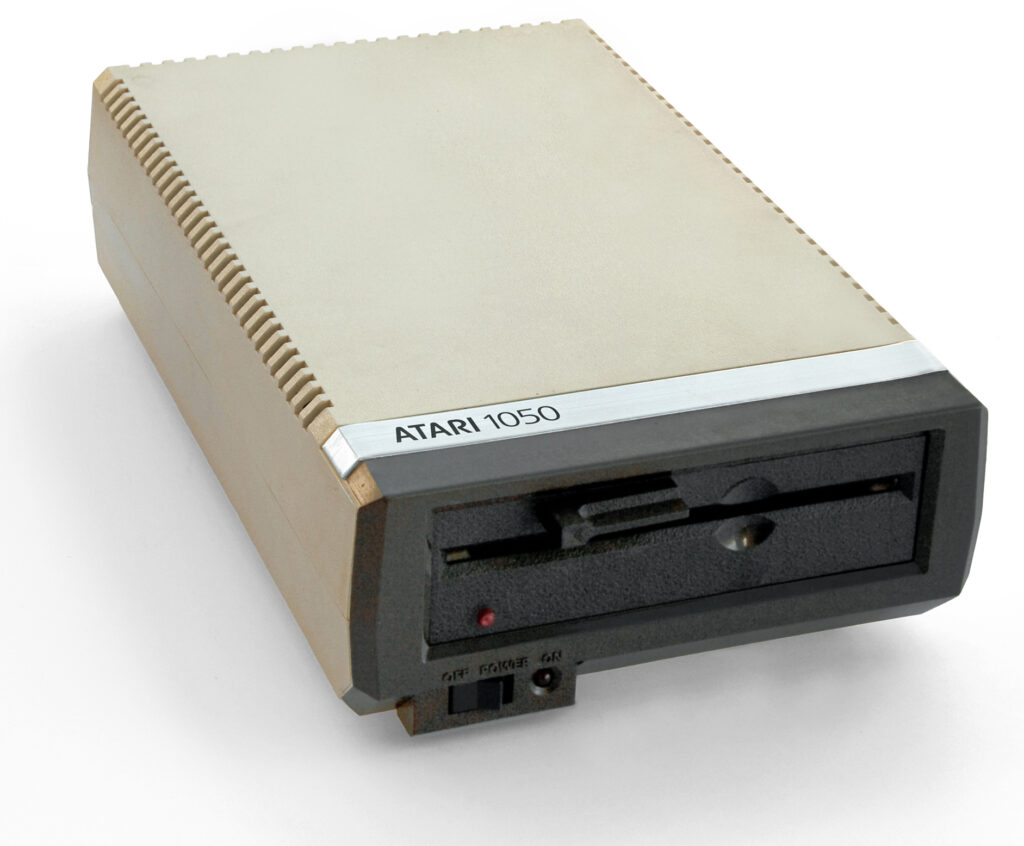
Instead, disk drive use was very popular. There were two main disk drives in the prime of the Atari 8-bit's lifespan: the original Atari 810, which followed the design language of the 400 and 800, and the Atari 1050, which was designed to fit in alongside a 600XL or 800XL setup. There was an even later XF551 drive, but this didn't really catch on for various reasons, and these drives are a lot harder to find today.
You connected a tape deck or disk drive to the Atari via its proprietary Serial Input/Output (SIO) port, and this brings us to one of the most historically significant things about the range: SIO was designed as a universal connector for all manner of different peripherals, not just media storage devices. Sound familiar? That's right; it's very much a precursor to modern USB; Joe Decuir, who created this architecture, holds patents on USB.
SIO had a few differences to modern USB, most notably the fact that devices could be daisy-chained together. This means that even though the system only had one SIO port, you could connect multiple devices simply by linking them together. Obviously this was dependent on the device in question having a suitable port — and not every device did — but in theory you could keep on linking as required, making it easy to have, for example, setups that used multiple disk drives, and even cassette and disk simultaneously if you so desired.
Using a disk drive with the Atari 8-bits required one extra step: the use of a Disk Operating System, or DOS. Atari made its own DOS that underwent several revisions over the lifespan of the Atari 8-bit models, and although closed source and distributed under a proprietary license agreement, it could be redistributed. Good job, too, because in order to actually boot something from disk, DOS needed to be loaded first. If you wanted to be able to save BASIC programs to disk, you also needed to boot DOS from disk before starting to write your program.
The most commonly seen versions of Atari's DOS from back in the day used a menu-driven interface that allowed various disk functions such as copying and deleting files as well as locking/protecting them, loading executable files that were not set up to automatically boot when turning the computer on, formatting disks and creating new DOS disks.
Programming on the Atari used, like most of its contemporaries, a dialect of BASIC. Unlike many other BASICs at the time, it is not a version of the popular Microsoft BASIC (although this was available) and thus had a number of its own unique Atari-specific commands. Carrying out many functions, particularly relating to graphics, that would require POKEs on other platforms could be done with dedicated commands on the Atari, but conversely Atari BASIC lacked the ability to create arrays in string variables. It was, on the whole, a well-liked language, and the two main Atari magazines of the era, Page 6 and Atari User (which later merged to become New Atari User), typically printed type-in listings for all manner of programs in every issue. Not just games, either; both magazines were keen to position the Atari computers as capable, multi-function devices that were far more than just sources of entertainment.
Other programming languages were, of course, available. Those keen to get their hands dirty could write programs using 6502 assembler, while as the years went by, speedy languages such as Action! and Turbo BASIC XL came along and offered compelling alternatives to the built-in or cartridge-based BASIC that was, for many, the foundation of programming on the Atari range. These languages could be compiled into executable binaries, too, meaning that an end user would not need a copy of the language to run a program written in it.
The Atari's audio-visual capabilities were very solid. The dual ANTIC and GTIA graphics chips offered hardware scrolling, built-in "player-missile" sprites, and a wealth of different graphics modes allowing various balances between memory usage, resolution and colour depth. The POKEY chip offered four-channel audio with a good amount of customisation — although not quite as flexible as the SID chip found in the Commodore 64. It also handled a lot of the Atari 8-bit's input/output, meaning the system has the charming feature of making blippity bloop sounds when loading and saving from/to disk or tape rather than the horrific screeching heard on other platforms.
And then we come to the games. While some of the high-profile software houses — notably outfits like Ocean, Imagine, Ultimate and suchlike — refused to support the Atari 8-bit, others, like Electronic Arts and Activision, did, at least in the early days, and the budget companies like Mastertronic, Atlantis, Zeppelin and Alternative had a good presence on the platform, too. The end result of this from a 2026 perspective is that the Atari 8-bit library is largely unique, with many titles not being found on any other platforms — and in the case of multiplatform affairs, the Atari release often being a particularly good version. (There are exceptions, of course; the Atari 8-bit versions of Action Biker and The Last V8 are woeful compared to the C64 releases.)
There's also the fact that a lot of games which went on to worldwide success on a variety of platforms often originated on Atari 8-bit. All-time classics like Boulder Dash, M.U.L.E., Miner 2049'er and Spelunker debuted on Atari before spreading to other platforms, and esteemed creators like Archer Maclean were really able to make the system sing with games like Dropzone.
The only thing the library is lacking compared to its more successful 8-bit counterparts is a library of solid arcade conversions from the years following the initial early '80s "golden age"; those early '80s titles are well-covered, however, with excellent versions of Pac-Man, Dig Dug, Pole Position, Qix and plenty more — and a wealth of "unofficial" clones, too.
So why doesn't this system get anywhere near the love and attention that the Commodore 64 and ZX Spectrum do? I honestly don't really know, because although the platform undoubtedly sold considerably less than both of its main rivals, I don't think one can in any respect call it a "failure". Its longest-lasting magazine published its final issue in 1998, for heaven's sake — and said magazine was including material for the Atari 8-bit right up until that very final issue. Not only that, the modern "homebrew" scene is incredibly active and vibrant to this day, with some truly amazing new games being released for the platform on a regular basis, along with some excellent ports of C64 and Spectrum games that never made it to Atari back in the day.
I would love to see the Atari 8-bit get more acknowledgement. There are some YouTubers who do give it its dues — Kim Justice is a good example — but I do wish the field of "gaming history" would, more broadly, pay attention to the Atari 8-bit: a platform that still has a lot to offer, which is a hell of a lot of fun to have been involved with since its original inception, and which is dead easy to explore today with solutions like Altirra for software emulation, and the excellent Atari800 core for MiSTer if you're an FPGA person.
Still, that's a big reason my YouTube channel exists. So I will continue to champion the system how I can — and at least then I know that I have done my part in remembering this wonderful platform and the many amazing journeys it has taken me on over the years.
Want to read my thoughts on various video games, visual novels and other popular culture things? Stop by MoeGamer.net, my site for all things fun where I am generally a lot more cheerful. And if you fancy watching some vids on classic games, drop by my YouTube channel.
If you want this nonsense in your inbox every day, please feel free to subscribe via email. Your email address won't be used for anything else.